Trochoids and Spirographs
Patterning now has direct support for two classic families of curves:
hypotrochoidtraces a point on a circle rolling inside another circle.epitrochoidtraces a point on a circle rolling outside another circle.
These are the kinds of curves often associated with "Spirograph" toys. In Patterning they are available directly as pattern-making functions, so you can treat them like any other figure and pass them to layouts and transformations.
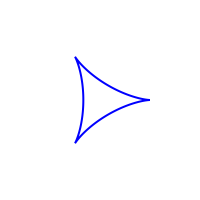
(set-standard-colors)

(hypotrochoid 0.5 (/ 0.5 3) (/ 0.5 3) 300 6
  {:stroke blue :stroke-weight 2})
The simplest call uses three arguments:
- a ratio between the fixed and rolling circles,
- the number of points used to draw each cycle,
- and the number of cycles to draw.
So (hypotrochoid 3 300 6) means: use ratio 3, draw 300 points per cycle, and continue for 6 cycles.
Patterning also provides a full form where you pass r1, r2, d, nopoints, num-cycles and a style map directly. That is what the examples on this page use when they want to specify the stroke style in the same call.
Changing the distance of the tracing point from the rolling circle's centre changes the character of the curve quite dramatically. Patterning provides a four-argument form for that:
(hypotrochoid ratio d nopoints num-cycles)
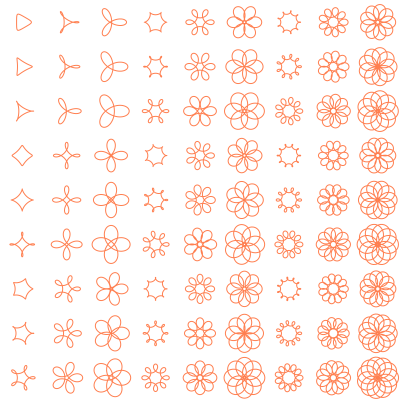
Varying the "number of points" also changes the shape from "three-cornered" to "four-cornered" to "five-cornered" etc.
(set-standard-colors)


(grid 3
  (map
   (fn [n]
     (grid 3
       (map
         (fn [d]
           (hypotrochoid 0.5 (/ 0.5 n) d 300 7
           {:stroke coral :stroke-weight 1}))
        [0.08 0.12 0.18
         0.22 0.26 0.32
         0.36 0.42 0.48])))
  [3 4 5 6 7 8 9 10 11 12]
 )
)
Epitrochoids
Epitrochoids are similar, but because the rolling circle moves on the outside they usually produce more open, radiating forms.
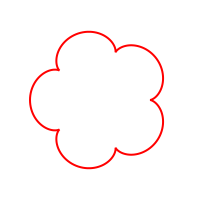
(set-standard-colors)

(epitrochoid 0.5 (/ 0.5 5) (/ 0.5 5) 320 5
  {:stroke red :stroke-weight 2})
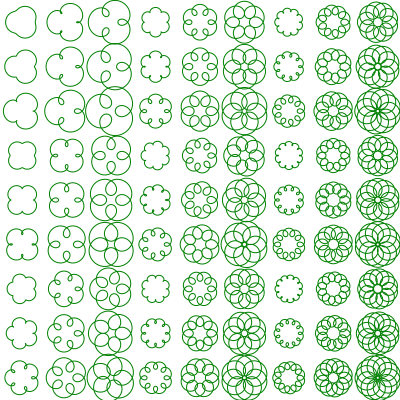
(set-standard-colors)
(grid 3
(map
(fn [n]
(grid 3
(map
(fn [d]
(epitrochoid 0.5 (/ 0.5 n) d 300 7
{:stroke dark-green :stroke-weight 1}))
[0.08 0.12 0.18
0.22 0.26 0.32
0.36 0.42 0.48])))
[3 4 5 6 7 8 9 10 11 12]
)
)
As usual in Patterning, the interesting part starts when we compose these curves with other operations. For example, we can stack several epitrochoids of different ratios to make a denser figure.
(apply stack
  (map
    (fn [[ratio col]]
      (epitrochoid 0.5 (/ 0.5 ratio) (/ 0.5 ratio) 360 6
        {:stroke col :stroke-weight 2}))
    [[2 (p-color 255 180 80 180)]
     [3 (p-color 255 100 120 180)]
     [5 (p-color 80 180 255 180)]]))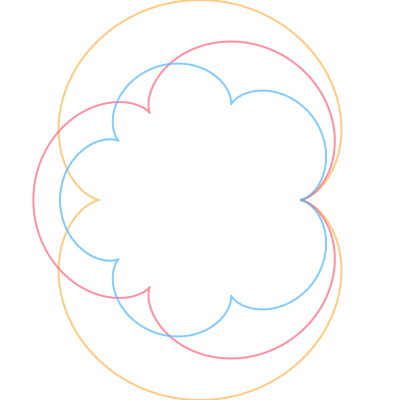
Or we can use the curves themselves as tiles in a layout.
(set-standard-colors)

(on-background
  (p-color 245 245 250)
  (grid 4
    (cycle
      [(hypotrochoid 0.5 (/ 0.5 3) (/ 0.5 3) 260 5
         {:stroke navy :stroke-weight 2})
       (epitrochoid 0.5 (/ 0.5 4) (/ 0.5 4) 260 4
         {:stroke magenta :stroke-weight 2})])))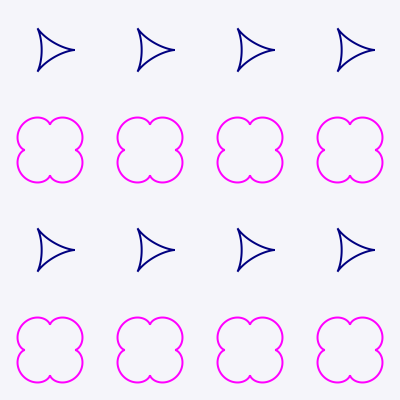
If you need even finer control, Patterning also provides hypotrochoid-points and epitrochoid-points, which return the underlying point sequences. But for many decorative uses the pattern functions are the easiest place to start.
Continue to HexGrid